Promo Period November 13 to December 13, 2026 (Friday to Sunday)
Qualified Cards
BDO Mastercard®, Visa, American Express®, JCB, and UnionPay Credit Cards
BDO Mastercard and Visa Debit Cards
How to Avail
The “Up to ₱1,000 OFF on Klook” (“Promo”) is open to Cardholders of BDO Credit Cards (Principal and Supplementary including Virtual Cards) and BDO Debit Cards (“Eligible Cards”). Payment brands accepted are as follows: Mastercard, Visa, American Express, JCB, and UnionPay. BDO Installment Cards are not eligible to avail of the Promo.
The Promo runs on weekends (Friday to Sunday) from November 13 to December 13, 2026 (“Promo Period”)
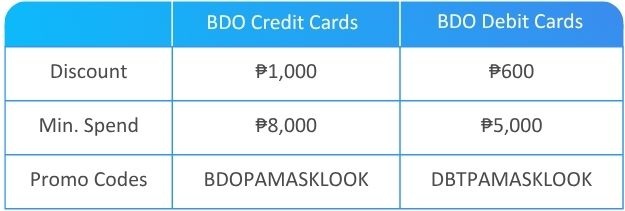
Offer: Up to ₱1,000 OFF on Klook every weekend for a minimum spend.
For Debit Cards: Set your purchase limit up to ₱200,000 per day before booking online! Just log in to the BDO Online app, go to More > Manage Cards > Select Debit Card > Set Daily Card Limits > Edit. View details here to know how.
How to avail:
Open your Klook mobile app or visit www.klook.com
Tap/Click on the preferred experience, service or activity and tap/click “Add to Cart” or “Book Now”
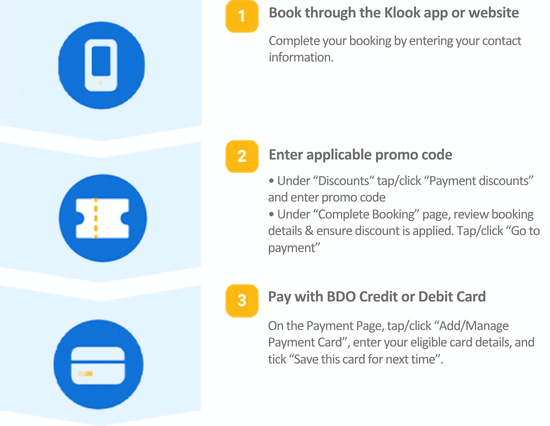
Complete your booking by entering your contact information
On the Complete Booking page, enter the applicable promo code.
Under “Discounts” tap/click “Payment discounts” and enter promo code and tap/click “use”
Under Complete Booking page, review the booking information and ensure discount is applied prior proceeding to payment by tapping/clicking “Go to payment”
On the Payment Page, tap/click “Add/Manage Payment Card”, enter your Eligible Card Details, and tick “Save this card for next time”.




 Dealsbook